ORDER MANAGEMENT
Create Orders Directly.
Handle Returns Just as Fast.
Spatialis OS empowers your team to generate, manage, and execute Sales Orders, Purchase Orders, and Work Orders directly inside an intuitive 3D interface — without forcing an expensive ERP seat license on every user who needs to create one.
And when inventory needs to come back, returns run through the same model instead of a manual process bolted onto the side.
Direct Order Creation
Traditional ERP platforms charge thousands of dollars per user license just to let warehouse managers, buyers, and floor leads create basic purchase orders, sales orders, or work orders. Spatialis OS gives your team native tools to manage inbound procurement, outbound sales, and internal production without ever leaving the system.
- Purchase Order (PO) Creation
- Generate purchase orders for suppliers, track incoming shipments, set expected dock dates, and trigger single-touch receiving workflows directly in 3D.
- Native Sales Order (SO) Processing
- Create outbound customer sales orders on the fly — instantly reserve inventory, verify 3D stock locations, and trigger visual pick paths for fulfillment.
- Work Order (WO) Execution
- Issue work orders for kitting, light manufacturing, or value-add services, automatically reserving component inventory and routing work to Assembly Core.
- Flexible Dual-Mode Operation
- Use Spatialis OS as your primary order-creation engine to save on ERP license costs, or leave your existing ERP as the system of record and sync directly with it.
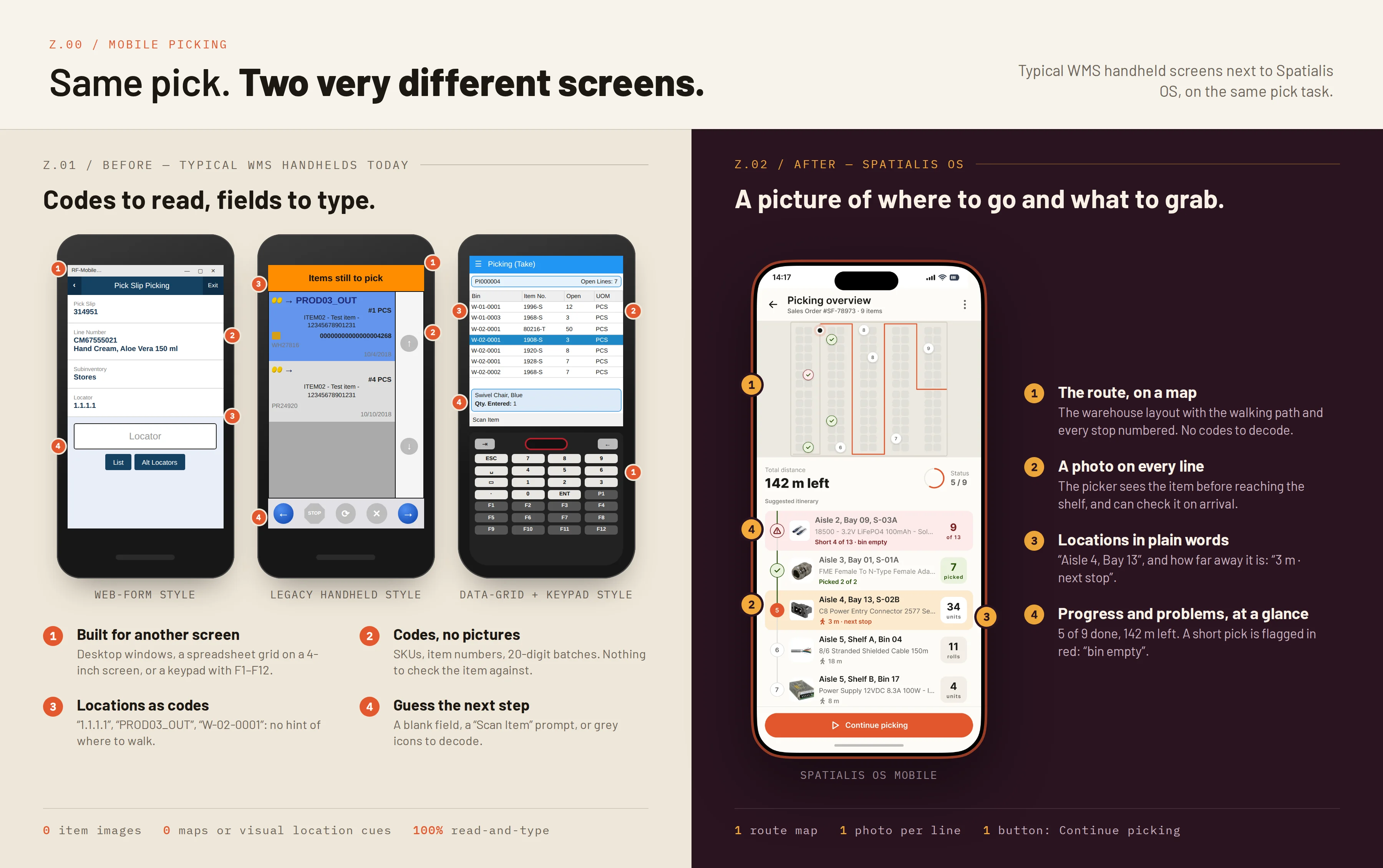
Mobile Picking: Before and After
Returns Management (RMA)
Reverse logistics run through the same 3D model as everything else: a return authorization routes inventory straight to automated inspection, re-stocking, or quarantine placement, instead of a manual process bolted onto the side of receiving.
- Automated Inspection Routing
- Returned items are routed directly to an inspection task the moment an RMA is opened, instead of sitting in an undefined holding area.
- Re-Stock or Quarantine Placement
- Based on the inspection outcome, Spatialis OS routes an item straight back to its optimal sellable bin — or to quarantine — with the same single-touch put-away logic as any inbound receipt.
FAQ
Questions about order management.
01Do we still need full ERP seats for staff who only create orders?
No — Spatialis OS lets department leads, buyers, and floor managers create Sales Orders, Purchase Orders, and Work Orders natively, so you don't need to buy an ERP seat for every person who needs that access.
02Can we keep using our existing ERP for order creation instead?
Yes — Direct Order Creation is optional dual-mode: sync directly with your existing ERP, or use Spatialis OS as the primary order-creation engine, whichever fits your operation.
03How are returns handled?
A return authorization routes the item straight to an automated inspection task, then either back to its optimal sellable bin or to quarantine — using the same single-touch put-away logic as any inbound receipt.
See the whole system: see how MRP feeds these orders → or explore Assembly Core →